

 Quick start
  Download
  Manual
  How to buy
  Contact
  Sign in
 How to send SMS messages from Java using HTTP requests
Download: send-sms-java-http.zip (5 Kb)This guide explains how to send SMS text messages to mobile phones form Java using HTTP requests. It includes an explanation and a sample code you can use in your application.
Introduction
HTTP is the simplest method to send data from one application to another. Java has native method calls to submit HTTP requests. This means that HTTP is a good choice to send SMS text messages to mobile phones. If you operate an SMS gateway in your network, for example the Ozeki NG SMS Gateway, you can pass SMS messages to it using HTTP GET or HTTP POST method calls (Figure 1).
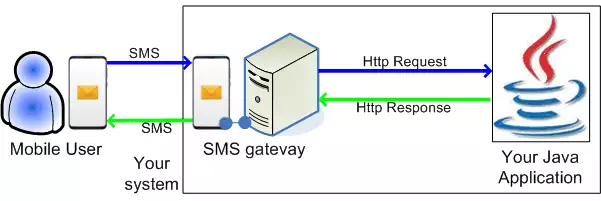
If you take look at the Figure 1, you will see, that to be able to communicate with mobile phones, you need to pass your messages to the HTTP Gateway. The HTTP Gateway has a built in webserver, that provides an HTTP SMS API, that makes it possible to submit messages. After your messages arrive to the SMS Gateway, they will be sent to the mobile network through one of the channels you have configured previously. For example, the SMS gateway can operate a mobile phone attached to the PC with a data cable and can use this mobile phone to send and receive your messages. It can also send the messages through the Internet to an SMS service provider.
If you want to receive SMS messages in your JAVA application, you have two options. You can periodically download incoming messages from the built in webserver of the Ozeki NG SMS Gateway, or you can setup an HTTP Client user, that will post incoming messages to your JAVA application through HTTP.
Prerequisites
To be able to setup this solution, you need the following:Installation and Configuration
If you are a JAVA developer, you should already have
the Java SE Development Kit installed on your computer and you probably already
use a development tool, such as Eclipse IDE. To be able to send SMS messages,
you
need to define a new JAVA class, and past the source code bellow into it.
To be able to submit messages, you also need to
install
and configure the Ozeki NG SMS Gateway software. In Ozeki NG SMS Gateway you
should configure an HTTP Server user. When you create an HTTP Server user,
you will provide a username and password. You can change the values of the
username and password variables in the source code bellow to the values you have
provided when you have defined the HTTP Server user in Ozeki NG SMS Gateway.
Source code sample
Feel free to use and modify this source code sample!
package hu.ozeki;

import java.net.*;

public class Java_example_httprequest {

        public static void main(String[] args) {
                try {
                        String recipient = "06205555555";
                        String message = "Hello World";
                        String username = "admin";
                        String password = "abc123";
                        String originator = "06201234567";

                        String requestUrl  = "http://127.0.0.1:9501/api?action=sendmessage&" +
            "username=" + URLEncoder.encode(username, "UTF-8") +
            "&password=" + URLEncoder.encode(password, "UTF-8") +
            "&recipient=" + URLEncoder.encode(recipient, "UTF-8") +
            "&messagetype=SMS:TEXT" +
            "&messagedata=" + URLEncoder.encode(message, "UTF-8") +
            "&originator=" + URLEncoder.encode(originator, "UTF-8") +
            "&serviceprovider=GSMModem1" +
            "&responseformat=html";


                        URL url = new URL(requestUrl);
                        HttpURLConnection uc = (HttpURLConnection)url.openConnection();

                        System.out.println(uc.getResponseMessage());

                        uc.disconnect();

                } catch(Exception ex) {
                        System.out.println(ex.getMessage());

                }
        }

}
|
More information