
Search the manual:

Overview Quick start Download Manual How to buy FAQ Contact Us
OZEKI NG SMS Gateway - Product Guide

HTTP Server connection Contents | SearchConfiguration

Home > Product Manual > Installation Guide > Service Provider Connections > HTTP Server connection > HTTPS

SMS Gateway SMS Gateway Home

  Product Manual
  Introduction
  SMS technology
  Installation Guide
  Prerequisites
  Download Information
  Installation Steps
  Service Provider Connections
  GSM Modem connectivity
  SMPP connection
  UCP Connection
  CIMD2 Connection
  HTTP Client connection
  HTTP Server connection
  HTTPS
  Configuration
  Service providers
  Send MMS via MM7
  Receive MMS via MM7
  Send and receive MMS via EAIF
  SAG ParlayX SOAP/XML
  TDC
  VoIP
  SNPP Connection
  SMTP Connection
  HTTP Service Provider
  Users and applications
  Linux
  User Guide
  Developers Guide
  Examples and Solutions
  Appendix
  FAQ
  Feature list
  Commercial Information
  Search


Contact Us!
If you wish to get further information, do not hesitate to contact us!

E-mail: info@ozekisms.com

If you have a technical question, please submit a support request on-line.


Callcenter developers
If you are working on telephone solutions, please check out the Ozeki VoIP SIP SDK.
It can be used to create:

Webphone solutions:
- Adobe Flash video phone
- Silverlight video phone
- Web to web calls
- Web to VoIP calls

Custom SIP clients:
- Silverlight SIP VoIP client
- Flash SIP VoIP client
- C# .net SIP VoIP client
- ASP .net SIP VoIP client
- Web based SIP VoIP client

Custom VoIP solutions:
- VoIP SIP softphones
- VoIP call center clients
- VoIP IVR systems
- VoIP predictive dialer systems
- VoIP auto dialer systems
- VoIP call assistant
- VoIP call recording systems
- VoIP intercom solutions

HTTPS server configuration


The HTTP server connection option allows you to receive incoming SMS messages or SMS delivery reports with http requests through the https protocol. To configure this option you need to set a base URL for the listening webserver with the https prefix (Figure 1) and you must configure a server certificate.
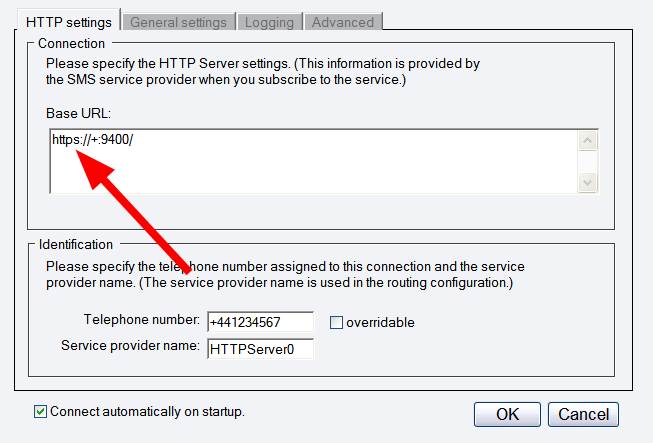

Figure 1 - Configure a https prefix

You can configure Server Certificates and other listener options by using HttpCfg.exe on Windows XP and Windows 2003 or netsh tool on Windows Vista. The httpcfg.exe executable is shipped with Windows Server 2003. For Windows XP SP2 it can be downloaded from "Windows XP SP2 Support Tools for Advanced Users".

The following webpage gives information on how you can configure a server certificate for a port: http://msdn.microsoft.com/en-us/library/ms733791.aspx.

Dig deeper!
People who read this also read...


Next page: Configuration
Copyright © 2000 - 2013 Ozeki Informatics Ltd.
All rights reserved

Software PBX for Windows | VoIP SDK   |   Legal information   |   Privacy policy   |   Terms of use
Please, address your inquiries to info@ozekisms.com