
7846 SMS Gateway - GSM Modem connectivity, USB connection


Search the manual:

Overview Quick start Download Manual How to buy FAQ Contact Us
OZEKI NG SMS Gateway - Product Guide

Connection problem Contents | SearchMMS downloads

Home > Product Manual > Installation Guide > Service Provider Connections > GSM Modem connectivity > USB connection

SMS Gateway SMS Gateway Home

  Product Manual
  Introduction
  SMS technology
  Installation Guide
  Prerequisites
  Download Information
  Installation Steps
  Service Provider Connections
  GSM Modem connectivity
  Installation of a Wavecom modem
  Multiple modems
  Installation of a modem driver
  CMS Error codes
  Connection problem
  USB connection
  MMS downloads
  GSM modem debugging
  Installation of a Sierra Fastrack modem
  Change frequency in Wavecom modem
  Transfer calls from SIM card
  Serial over Ethernet connection
  SMPP connection
  UCP Connection
  CIMD2 Connection
  HTTP Client connection
  HTTP Server connection
  Service providers
  Send MMS via MM7
  Receive MMS via MM7
  Send and receive MMS via EAIF
  ParlayX
  TDC
  VoIP
  SNPP Connection
  SMTP Connection
  HTTP Service Provider
  Users and applications
  Linux
  User Guide
  Developers Guide
  Examples and Solutions
  Appendix
  FAQ
  Feature list
  Commercial Information
  Search


Contact Us!
If you wish to get further information, do not hesitate to contact us!

E-mail: info@ozekisms.com

If you have a technical question, please submit a support request on-line.


Callcenter developers
If you are working on telephone solutions, please check out the Ozeki VoIP SIP SDK.
It can be used to create:

Webphone solutions:
- Adobe Flash video phone
- Silverlight video phone
- Web to web calls
- Web to VoIP calls

Custom SIP clients:
- Silverlight SIP VoIP client
- Flash SIP VoIP client
- C# .net SIP VoIP client
- ASP .net SIP VoIP client
- Web based SIP VoIP client

Custom VoIP solutions:
- VoIP SIP softphones
- VoIP call center clients
- VoIP IVR systems
- VoIP predictive dialer systems
- VoIP auto dialer systems
- VoIP call assistant
- VoIP call recording systems
- VoIP intercom solutions

Installing USB modems


You can install USB modems to send SMS messages into your system. The advantage to using USB modems is that you can install many modems because you are not limited by the number of physical serial (COM) ports in the system. The disadvantage is that USB modems require you to install a driver that registers a serial port in the system. This driver can be corrupt and can cause problems. This guide gives you instructions on how to use USB modems.

Introduction

When you install the driver for an USB modem or an USB to RS232 data cable, a new serial port is registered in the system. This serial port should be configured in Ozeki NG SMS gateway when you setup the GSM Modem service provider connection. To find out what is the port name that belongs to the newly installed modem, you should check the available ports in your system prior to the installation of the USB modem or USB data cable driver.

Check available ports prior to USB driver installation

To check the available ports, please open the "Windows control panel", click on "System", then select the "Hardware tab" in the System properties windows. Then click on the "Device Manager". In the Device manager, please open the ports section to see a list of serial ports prior to the USB modem installation (Figure 1).
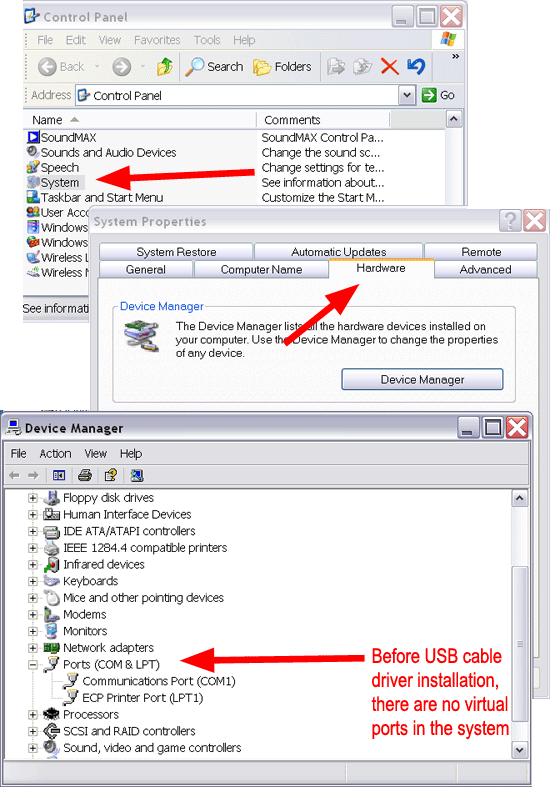

Figure 1 - Determine available ports before installation

Install USB driver

The next step is to install the USB modem or USB data cable driver. Then you should plugin your USB modem or phone to your computer (Figure 2).
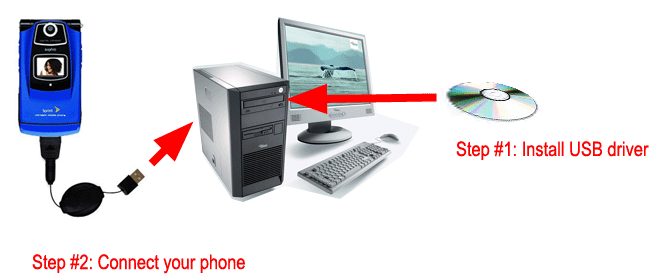

Figure 2 - Install USB driver

Check available ports after USB driver installation

After you have installed your USB modem or USB data cable driver your system properties windows will show a new serial port in your system (Figure 3).
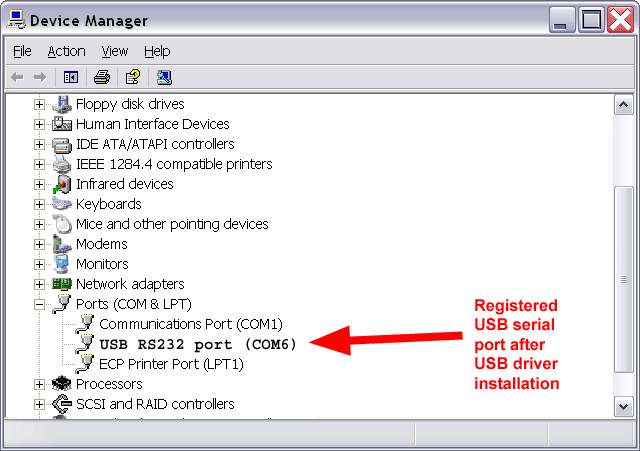

Figure 3 - USB serial port

Configure this serial port in the system.

Dig deeper!
People who read this also read...


Next page: MMS downloads
Copyright © 2000 - 2013 Ozeki Informatics Ltd.
All rights reserved

Software PBX for Windows | VoIP SDK   |   Legal information   |   Privacy policy   |   Terms of use
Please, address your inquiries to info@ozekisms.com


0