7fd3 SMS Gateway - SQL SMS Gateway, PostgreSQL script


Search the manual:

Overview Quick start Download Manual How to buy FAQ Contact Us
OZEKI NG SMS Gateway - Product Guide

Oracle script Contents | SearchAccess

Home > Product Manual > Examples and Solutions > SQL SMS Gateway > PostgreSQL script

SMS Gateway SMS Gateway Home

  Product Manual
  Introduction
  SMS technology
  Installation Guide
  User Guide
  Developers Guide
  Examples and Solutions
  Telephone networks
  Pin game
  E-mail to SMS Alerts
  2 way SMS to Email gateway
  SMS Order System
  Least Cost Routing
  Load Balancing
  Asterisk PBX SMS
  SQL SMS Gateway
  Database Link Management
  MySQL Script
  PostgreSQL script
  Access
  Oracle script
  Recipient list
  SMS Service Provider
  Service Provider
  SMS PIN code query
  SMS Counter game
  SMS newsgroup
  Distributed SMS
  SMS Menu
  Google maps
  Forwarding
  Birthday greeting - SQL Express
  Birthday greeting - MySQL
  Birthday greeting - Oracle
  Instant brochure - MMS autoreply
  Alphabet letter game
  SMS sport betting service
  E-mail about outgoing SMS messages
  SMS Information Menu
  Email to SMS feature
  Reminder example
  Bulk SMS Client
  Bulk SMS to a given phone number range
  Filtering phone numbers
  Appendix
  FAQ
  Feature list
  Commercial Information
  Search


Contact Us!
If you wish to get further information, do not hesitate to contact us!

E-mail: info@ozekisms.com

If you have a technical question, please submit a support request on-line.


Callcenter developers
If you are working on telephone solutions, please check out the Ozeki VoIP SIP SDK.
It can be used to create:

Webphone solutions:
- Adobe Flash video phone
- Silverlight video phone
- Web to web calls
- Web to VoIP calls

Custom SIP clients:
- Silverlight SIP VoIP client
- Flash SIP VoIP client
- C# .net SIP VoIP client
- ASP .net SIP VoIP client
- Web based SIP VoIP client

Custom VoIP solutions:
- VoIP SIP softphones
- VoIP call center clients
- VoIP IVR systems
- VoIP predictive dialer systems
- VoIP auto dialer systems
- VoIP call assistant
- VoIP call recording systems
- VoIP intercom solutions

PostgreSQL create table script


Introduction

To create an SQL SMS Gateway with Ozeki NG, you can use a PostgreSQL database, which can be accessed using an ADO or ODBC driver. All you have to do is create two database tables (in the ozekisms database): ozekimessagein and ozekimessageout. (The tables can have additional columns.) Ozeki NG - SMS Gateway will insert incoming messages into the ozekimessagein table. If you want to send a message, you should insert a record into the ozekimessageout table. The SMS Server periodically checks this table for messages to send.

Creating the database and the tables

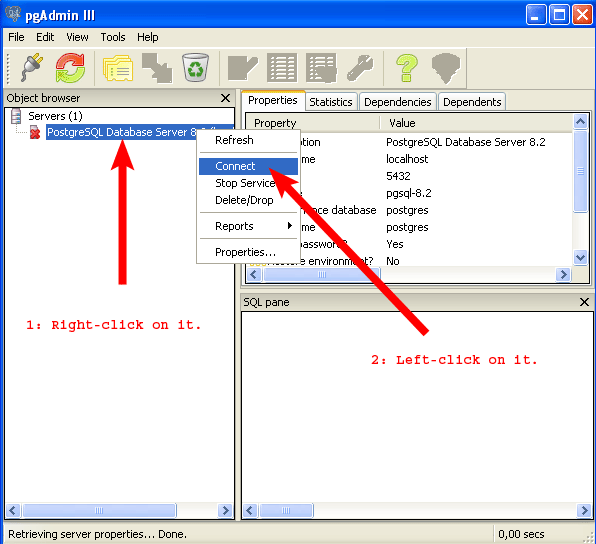
Start pgAdmin: Start menu -> All Programs -> PostgreSQL 8.2 -> pgAdmin III. Right-click PostgreSQL Database Server 8.2, and left-click Connect. Then, fill in   the password field and connect.


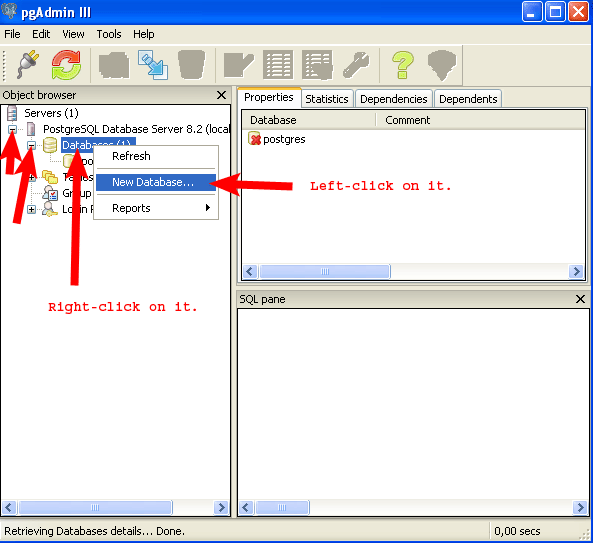
Create the  ozekisms database. Right-click Databases, then left-click New Database.


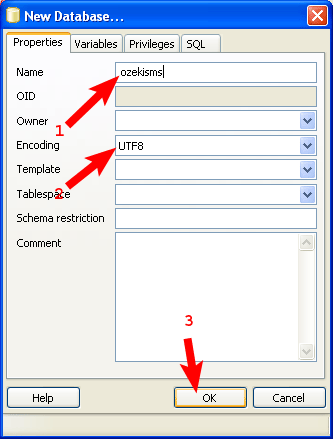
Fill in the Name and the Encoding field, and click OK.


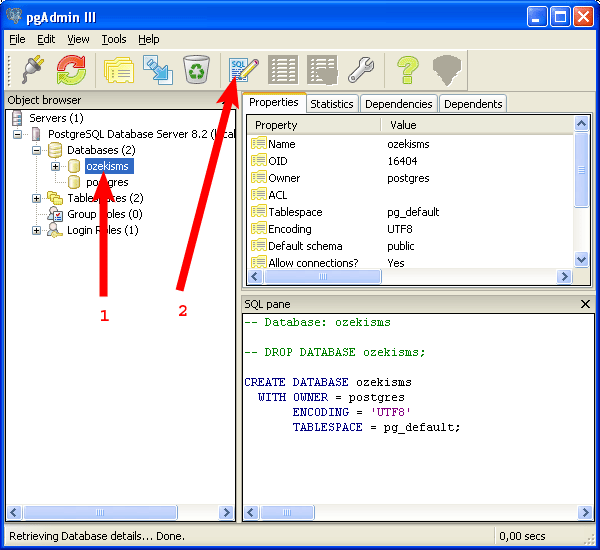
Select the ozekisms database, and click the SQL icon for creating tables.


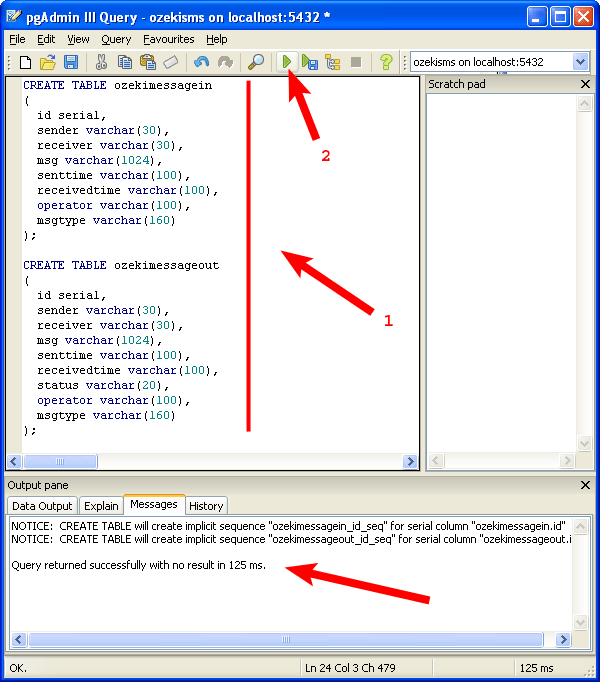
Copy the following text into the window, and click "Execute query":

CREATE TABLE ozekimessagein
(
  id serial,
  sender varchar(30),
  receiver varchar(30),
  msg varchar(1024),
  senttime varchar(100),
  receivedtime varchar(100),
  operator varchar(100),
  msgtype varchar(160)
);

CREATE TABLE ozekimessageout
(
  id serial,
  sender varchar(30),
  receiver varchar(30),
  msg varchar(1024),
  senttime varchar(100),
  receivedtime varchar(100),
  status varchar(20),
  operator varchar(100),
  msgtype varchar(160)
);
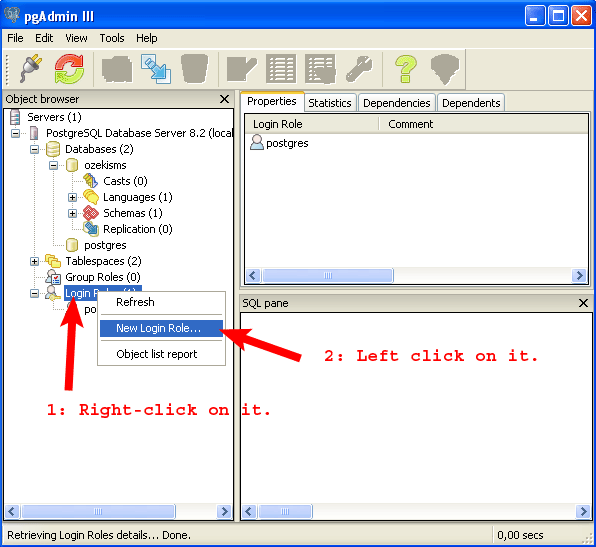
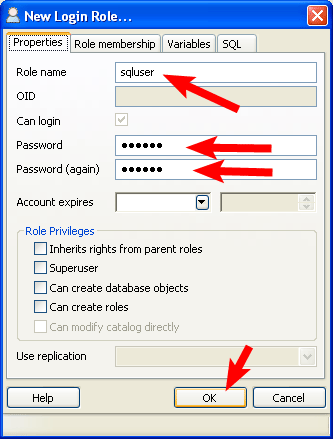

You have to create a user. It will be named "sqluser" and its password will be abc123.


Select the ozekisms database and click the SQL icon for grant rights.


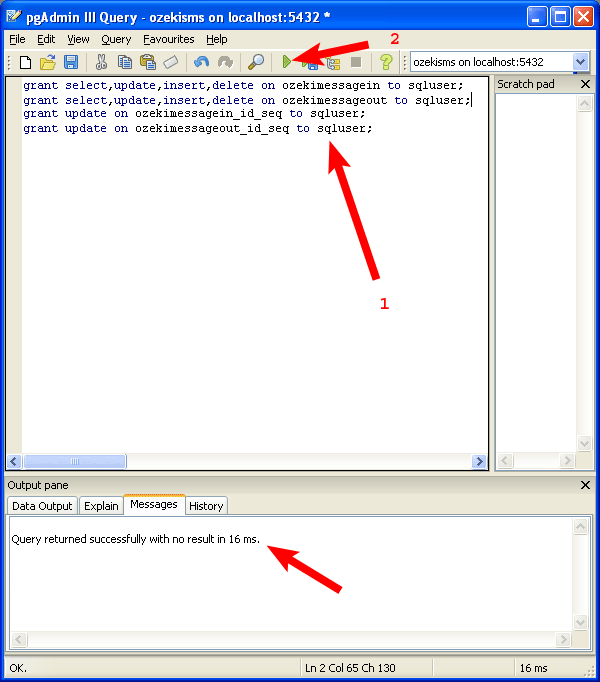
Copy  the following text into the window, and  click "Execute query":

grant select,update,insert,delete on ozekimessagein to sqluser;
grant select,update,insert,delete on ozekimessageout to sqluser;
grant update on ozekimessagein_id_seq to sqluser;
grant update on ozekimessageout_id_seq to sqluser;

We need the  last 2 rows to access the serial ids.


When you are finished, you have to install Odbc driver for PostgreSQL.
In Ozeki NG the connection string type will be "Odbc" and the connection string will be:

DRIVER={PostgreSQL Unicode};Server=localhost;Database=ozekisms;uid=sqluser;Password=abc123;


Dig deeper!
People who read this also read...


Next page: Access
Copyright © 2000 - 2013 Ozeki Informatics Ltd.
All rights reserved

Software PBX for Windows | VoIP SDK   |   Legal information   |   Privacy policy   |   Terms of use
Please, address your inquiries to info@ozekisms.com


0