

 Quick start
  Download
  Manual
  How to buy
  Contact
  Sign in
 SQL Reporting in Ozeki NG SMS Gateway - Database layout (Oracle)
This page gives you the database connection information and the database layout if you want to setup SQL reporting in an Oracle database server. SQL reporting makes it possible to keep track of all incoming and outgoing messages in the system regardless of who sent it.
To be able to send and receive SMS messages from Oracle 11G XE first you need to create two database tables: "ozekimessagein" and "ozekimessageout". You can find the instructions on this process on this page. The SMS gateway will use SQL queries for sending messages.
Ozeki NG SMS Gateway needs to be connected to the mobile network. You can do this in two ways: you can attach a GSM modem to the PC with a datacable (GSM connectivity) or the SMS gateway can connect directly to the SMS center of the mobile service provider over the Internet (IP SMS connectivity).
You can configure Ozeki NG SMS Gateway with the help of the Graphical User Interface (GUI).
Configuration steps
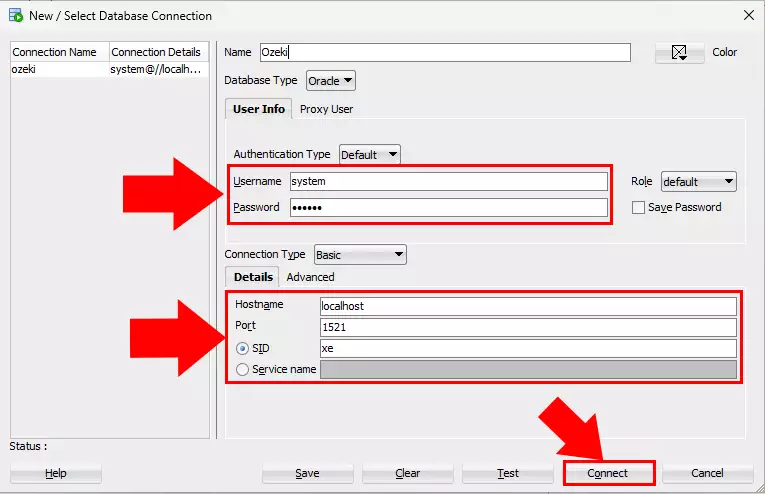
To configure your SMS system first you need to install Oracle 21c XE to your computer. Then log into it from the SQL developer tool (Figure 1).
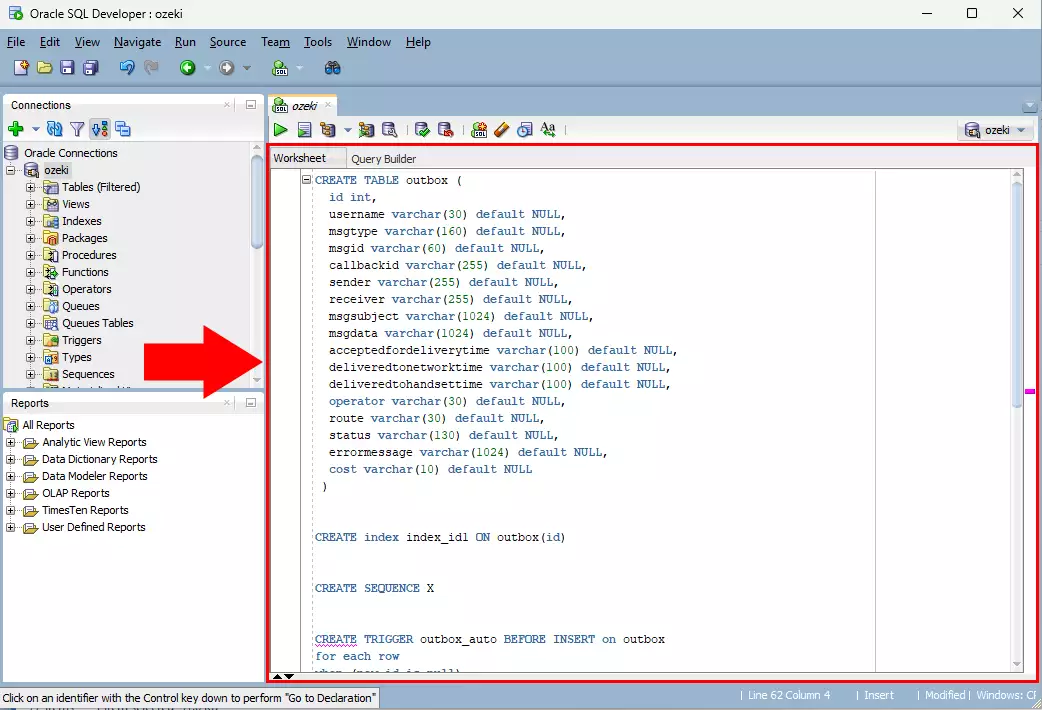
aste Create table query (Figure 2).
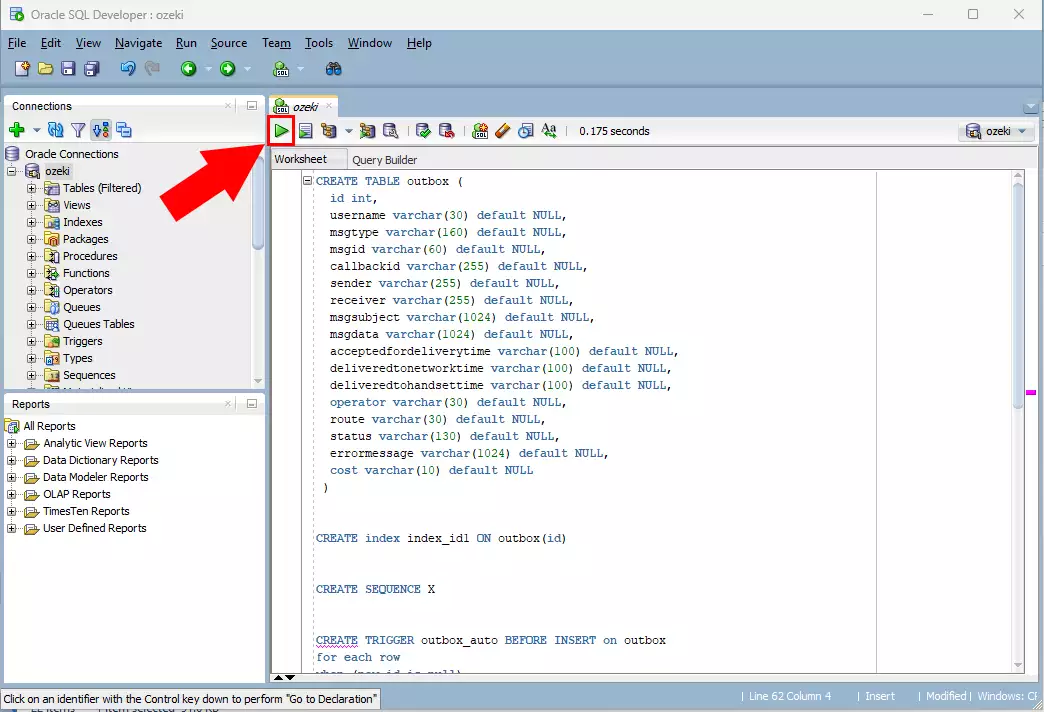
Now specify SQL commands. Enter the statements below to create the table layouts. Please click on Run after each command (Figure 3).
You can use the following sql example.
CREATE TABLE outbox (
  id int,
  username varchar(30) default NULL,
  msgtype varchar(160) default NULL,
  msgid varchar(60) default NULL,
  callbackid varchar(255) default NULL,
  sender varchar(255) default NULL,
  receiver varchar(255) default NULL,
  msgsubject varchar(1024) default NULL,
  msgdata varchar(1024) default NULL,
  acceptedfordeliverytime varchar(100) default NULL,
  deliveredtonetworktime varchar(100) default NULL,
  deliveredtohandsettime varchar(100) default NULL,
  operator varchar(30) default NULL,
  route varchar(30) default NULL,
  status varchar(130) default NULL,
  errormessage varchar(1024) default NULL,
  cost varchar(10) default NULL
 )


CREATE index index_id1 ON outbox(id)


CREATE SEQUENCE X


CREATE TRIGGER outbox_auto BEFORE INSERT on outbox
for each row
when (new.id is null)
begin
   SELECT x.nextval INTO :new.id FROM DUAL;
end


CREATE TABLE  inbox (
  id int,
  username varchar(30) default NULL,
  msgtype varchar(160) default NULL,
  msgid varchar(60) default NULL,
  sender varchar(255) default NULL,
  receiver varchar(255) default NULL,
  msgsubject varchar(1024) default NULL,
  msgdata varchar(1024) default NULL,
  senttime varchar(100) default NULL,
  receivedtime varchar(100) default NULL,
  operator varchar(30) default NULL
);


CREATE index index_id2 ON inbox(id)


CREATE SEQUENCE Y


CREATE TRIGGER inbox_auto BEFORE INSERT on inbox
  for each row
  when (new.id is null)
  begin
   SELECT y.nextval INTO :new.id FROM DUAL;
end
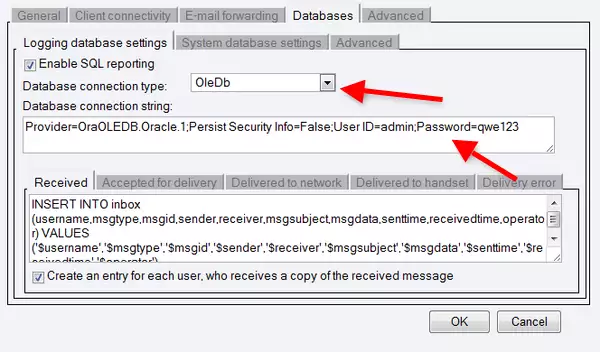
In Ozeki NG SMS Gateway go to Server preferences in Edit menu. On Databases tab check Enable SQL logging checkbox (Figure 4). Then select the Database connection type and specify the Database connection string:
The database connection type, you should select is:
OleDb
The database connection string you should use is:
Provider=OraOLEDB.Oracle.1;Persist Security Info=False;User ID=admin;Password=qwe123
If you have any questions please contact us at info @ ozekisms.com!
More information