

 Quick start
  Download
  Manual
  How to buy
  Contact
  Sign in
 Birthday greeting SMS service with Oracle and Ozeki NG SMS Gateway software
This page provides you detailed setup instructions on how to send birthday SMS greetings from Oracle database with Ozeki NG SMS Gateway.
First of all you need to configure Ozeki NG SMS Gateway software to be able to send SMS messages from your PC. You can find step-by-step guide at: Quick start guide. The Ozeki SMS software is able to connect to the mobile network either with a GSM modem connection or IP SMS connection.
After you have configured your Ozeki NG SMS Gateway software and you can also install a service provider connection to connect the SMS software to the mobile network, you need to configure your Oracle database. Please find the configuration guide at: How to send SMS from Oracle.
If you have configured your system you can start to setup the birthday greeting SMS service with Oracle and Ozeki NG SMS Gateway software.
Configuration guide
So it is assumed that you have already installed Ozeki NG SMS Gateway software and Oracle database with all its components.
These are the main steps of the configuration of birthday greeting SMS service:
- Start SQL Developer (it is a component of Oracle database)
- Create the connection to database
- Create database table
- Create a sequence to move the ID
- Create a trigger to move the ID
- Load data into the database
- Install and configure a Database user in Ozeki NG SMS Gateway
To configure birthday greeting SMS service, start SQL Developer program of Oracle database in Start menu.
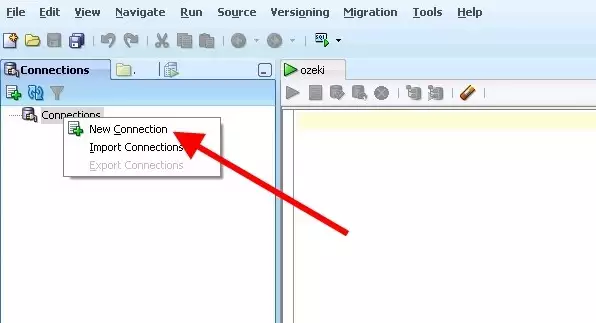
Add a new connection to the database by right clicking on
Connections and click on New Connection (Figure 1).
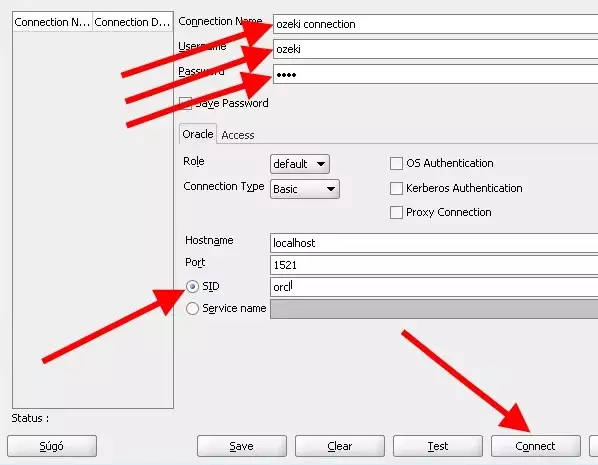
Specify the parameters in the appeared window (Figure 2):
Connection Name: You can provide any name you wish (in our example it is
"ozeki connection").
Username: the username you use to access to the database
Password: the password you use to access to the database
In SID field you need to enter the name that has been provided to the
database when it is installed (installation name of the database).
Finally click on Connect.
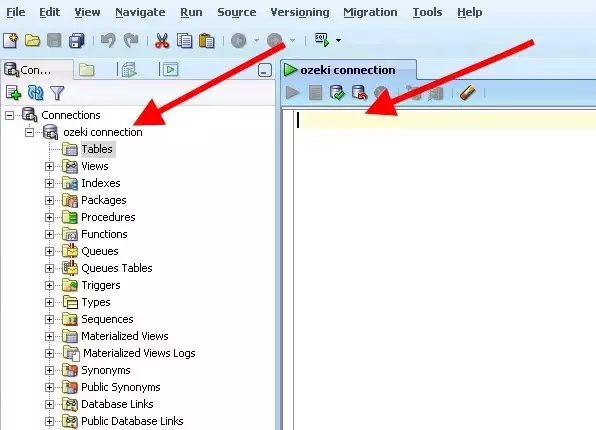
On Figure 3 you can see that the connection has been created.
Now create a database table. In the empty field you can type the SQL statements that will create the required database table (Figure 4). To execute the SQL query click on the green arrow.
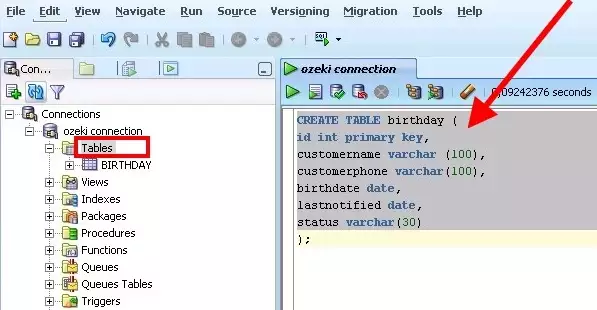
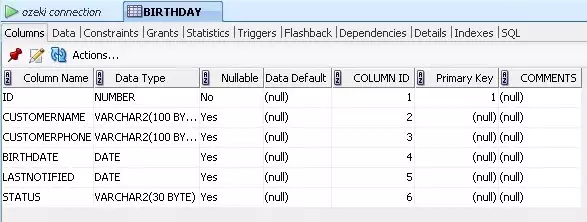
On Figure 5 you can see the created database table.
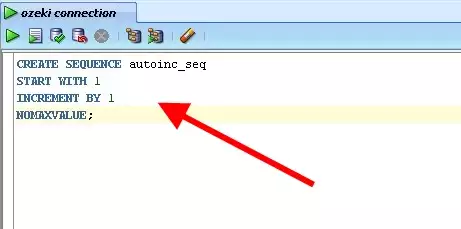
Create a sequence to move the primary key (ID) of the table (Figure 6).
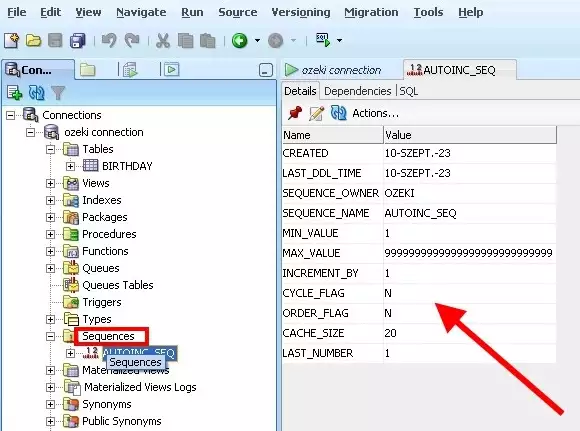
On Figure 7 you can see the created sequence.
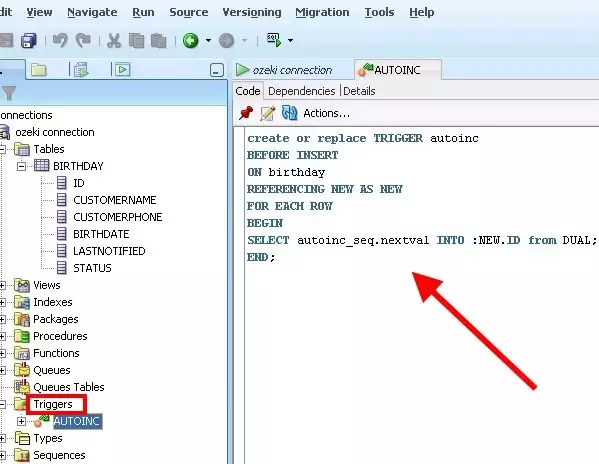
You also need to create a trigger (Figure 8). This trigger uses the created sequence and moves the primary key (ID) of the table.
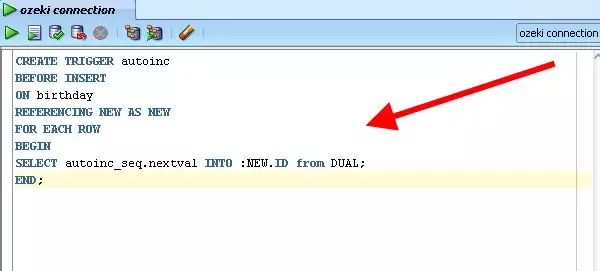
You can see the created trigger (Figure 9).
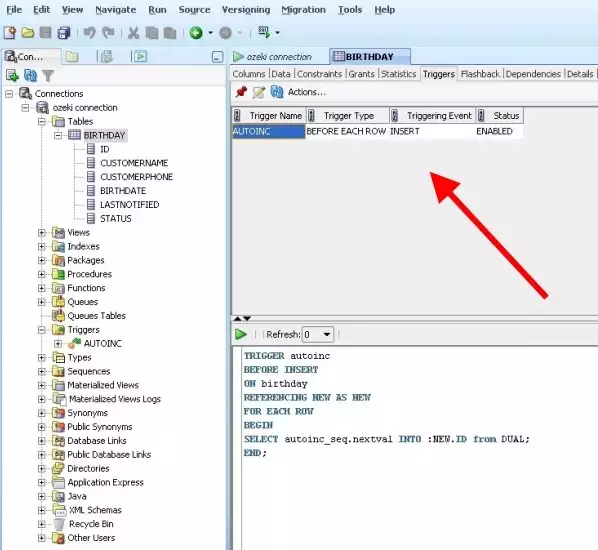
On Figure 10 you can also see the created trigger among the triggers of birthday table.
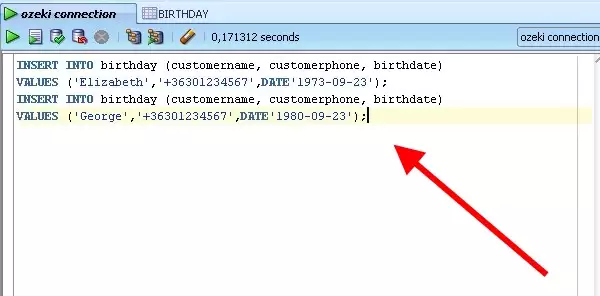
Now you can enter data into the table (Figure 11) in the following way:
INSERT INTO birthday (customername, customerphone, birthdate) VALUES
('Elizabeth','+36301234567',DATE'2010-09-22');
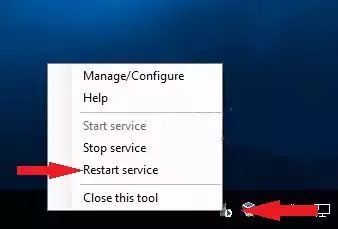
Start Ozeki NG SMS Gateway service (Figure 12).
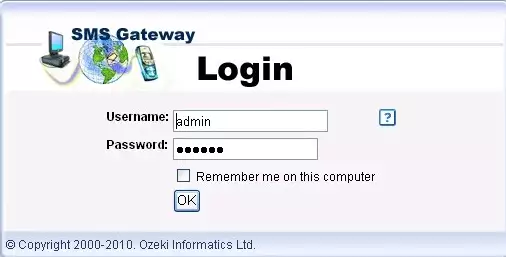
Log into Ozeki NG SMS Gateway (Figure 13).
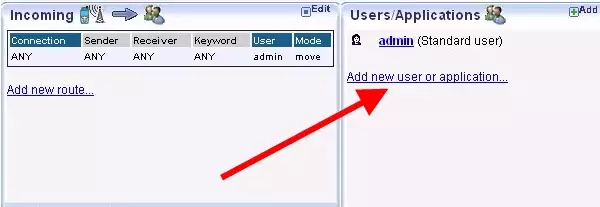
Install a Database user by clicking on Add new user or application (Figure 14).
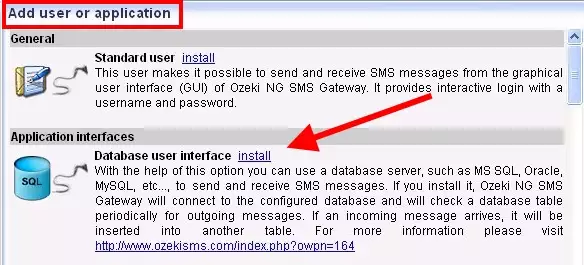
Select Database user interface and click on Install next to it (Figure 15).
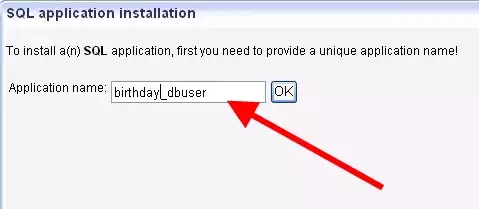
Provide a name for the Database user - in our example it is "birthday_dbuser" (Figure 16).
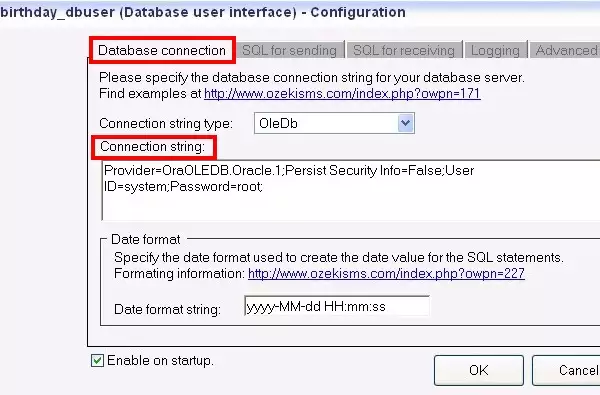
Finally configure the installed Database user. On Database
connection tab you need to specify the follows:
Connection string type: OleDb
Connection string:
Provider=OraOLEDB.Oracle.1;Persist Security Info=False;User ID=ozeki;Password=root;
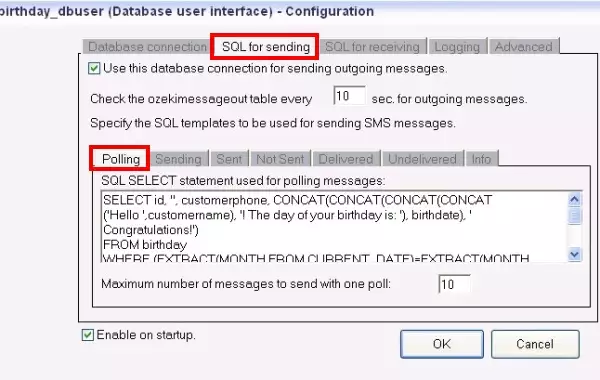
On SQL for sending tab you also need to specify the SQL statements.
Polling tab on SQL for sending panel:
SELECT id, '', customerphone, CONCAT(CONCAT(CONCAT(CONCAT('Hello ',customername),
'! The day of your birthday is: '), birthdate), ' Congratulations!')
FROM birthday
WHERE (EXTRACT(MONTH FROM CURRENT_DATE)=EXTRACT(MONTH FROM birthdate))
AND (EXTRACT(DAY FROM CURRENT_DATE)=EXTRACT(DAY FROM birthdate))
AND ((lastnotified is null) or (not(EXTRACT(YEAR FROM CURRENT_DATE))=(EXTRACT(YEAR
FROM lastnotified))))
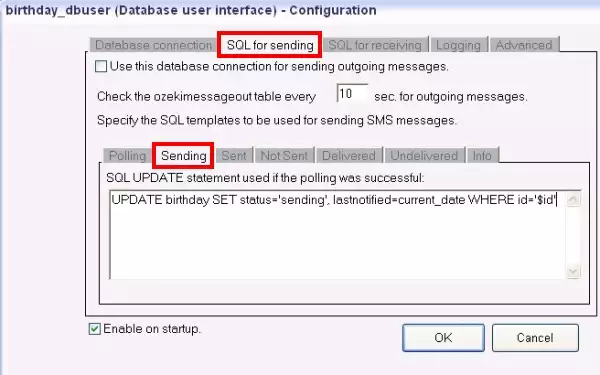
Sending tab on SQL for sending panel:
UPDATE birthday SET status='sending', lastnotified=current_date WHERE id='$id'
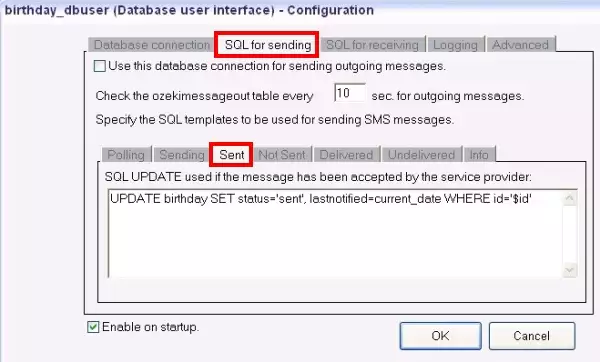
Sent tab on SQL for sending panel:
UPDATE birthday SET status='sent', lastnotified=current_date WHERE id='$id'
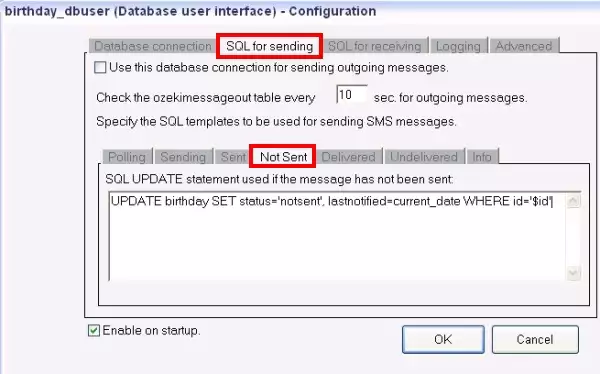
Notsent tab on SQL for sending panel:
UPDATE birthday SET status='notsent', lastnotified=current_date WHERE id='$id'
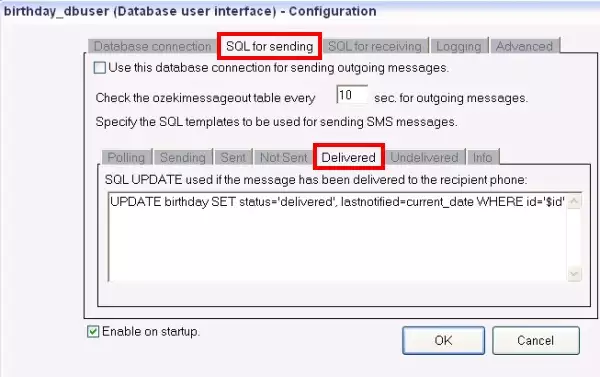
Delivered tab on SQL for sending panel:
UPDATE birthday SET status='delivered', lastnotified=current_date WHERE id='$id'
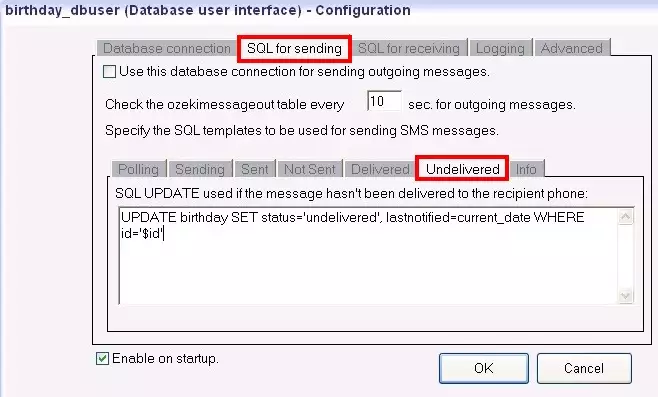
Undelivered tab on SQL for sending panel:
UPDATE birthday SET status='undelivered', lastnotified=current_date WHERE id='$id'
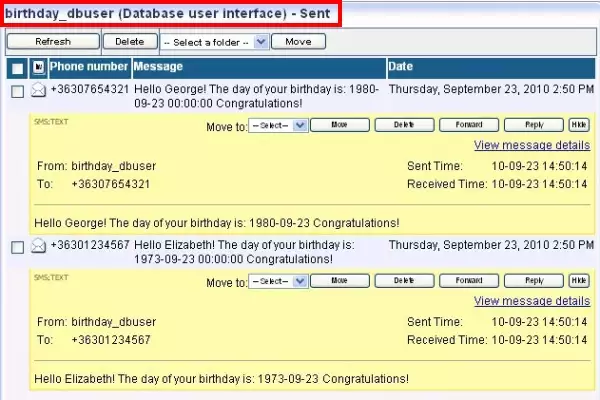
On Figure 24 you can see that Ozeki NG SMS Gateway has sent out the test messages after I followed the configuration steps above.
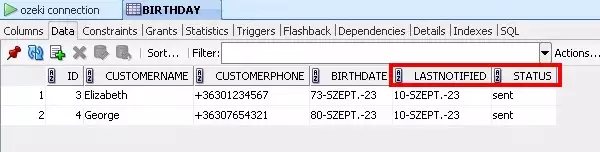
On Figure 25 you can also see that the status of the birthday greetings has also been modified to "sent" in the database.
More information
- Examples and SMS solutions
- SMS Reminder example
- SMS newsgroup
- SMS Forwarding
- Ozeki Phone Sytem PBX SMS
- SMS order System
- SMS Menu
- Google maps SMS
- Distributed SMS
- Birthday greeting SMS service MySQL
- Birthday greeting SMS service Oracle
- Birthday greeting SMS service SQL Express
- Feature list of the Ozeki NG SMS Gateway
- FAQ of the Ozeki NG SMS Gateway