
Search the manual:

Overview Quick start Download Manual How to buy FAQ Contact Us
OZEKI NG SMS Gateway - Product Guide

PostgreSQL Contents | SearchDate Format Strings

Home > Product Manual > Installation Guide > Users and applications > Database user > Pervasive SQL

SMS Gateway SMS Gateway Home

  Product Manual
  Introduction
  SMS technology
  Installation Guide
  Prerequisites
  Download Information
  Installation Steps
  Service Provider Connections
  Users and applications
  Standard user
  SMPP user
  Database user
  MSSQL
  MySQL
  Oracle
  Sybase SQL Anywhere
  PostgreSQL
  Pervasive SQL
  Date Format Strings
  Scheduled SMS
  SQL templates
  Informix
  Access
  Video
  Connection string builder
  Keywords
  Batch processing
  SQL statements
  Polling technology
  Dynamic Keywords
  Dynamic SMPP parameters
  AutoreplyDatabase user
  Autoreply user
  AutoReplyEasy user
  File user
  E-mail user
  HTTP Client user
  Colour SMS user
  Appstarter user
  SMS Voting
  Outlook Mobile Service
  FTP user
  PDF user
  WCF Client User
  Forwarder user
  Linux
  User Guide
  Developers Guide
  Examples and Solutions
  Appendix
  FAQ
  Feature list
  Commercial Information
  Search
 

Contact Us!
If you wish to get further information, do not hesitate to contact us!

E-mail: info@ozekisms.com

If you have a technical question, please submit a support request on-line.


Callcenter developers
If you are working on telephone solutions, please check out the Ozeki VoIP SIP SDK.
It can be used to create:

Webphone solutions:
- Adobe Flash video phone
- Silverlight video phone
- Web to web calls
- Web to VoIP calls

Custom SIP clients:
- Silverlight SIP VoIP client
- Flash SIP VoIP client
- C# .net SIP VoIP client
- ASP .net SIP VoIP client
- Web based SIP VoIP client

Custom VoIP solutions:
- VoIP SIP softphones
- VoIP call center clients
- VoIP IVR systems
- VoIP predictive dialer systems
- VoIP auto dialer systems
- VoIP call assistant
- VoIP call recording systems
- VoIP intercom solutions

How to send SMS text messages from Pervasive SQL


This guide provides you information on how to send and receive SMS text messages using Pervasive SQL with Ozeki NG SMS Gateway. You need to download and install Ozeki NG SMS Gateway to your computer and then create a database user in the software. Please find a more detailed configuration guide below.

  1. Step: Install Pervasive SQL

  2. Step: Start Pervasive Control Center and Documentation

  3. Step: Click on Create a new SQL document option

  4. Step: Select the database in which you wish to create database tables

  5. Step: Insert Create table script

    CREATE TABLE "ozekimessagein"(
     "id" IDENTITY DEFAULT '0',
     "sender" VARCHAR(50),
     "receiver" VARCHAR(50),
     "msg" VARCHAR(320),
     "senttime" VARCHAR(100),
     "receivedtime" VARCHAR(100),
     "operator" VARCHAR(100),
     "msgtype" VARCHAR(160),
     "reference" VARCHAR(100),
     PRIMARY KEY ("id")
    );


    CREATE TABLE "ozekimessageout"(
     "id" IDENTITY DEFAULT '0',
     "sender" VARCHAR(50),
     "receiver" VARCHAR(50),
     "msg" VARCHAR(320),
     "senttime" VARCHAR(100),
     "receivedtime" VARCHAR(100),
     "reference" VARCHAR(100),
     "status" VARCHAR(50),
     "msgtype" VARCHAR(160),
     "operator" VARCHAR(100),
     "errormsg" VARCHAR(250),
     PRIMARY KEY ("id")
    );


  6. Step: In SQL menu click on Execute all SQL statements option

  7. Step: Start Ozeki NG SMS Gateway and create a database user

  8. Step: Set Connection string type to OleDb and insert the connection string in Database connection tab

Provider=PervasiveOLEDB.;Data Source=DataBaseName;User
ID=UserName;Location=DBHostName;Persist Security Info=False

In this example I used the following parameters (Figure 1):

Database name: OZEKI
Username: test
Location: localhost

In the connection string please specify YOUR values.
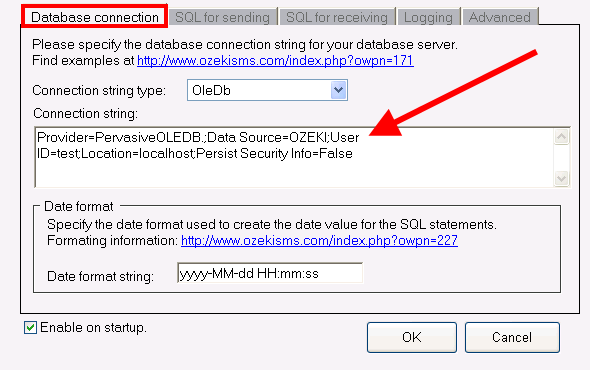

Figure 1 - Specify connection string

Dig deeper!
People who read this also read...

Quick start guide for Ozeki NG SMS Gateway
GSM modem connection
IP SMS connection
How to create database user in the SMS gateway


Next page: Date Format Strings
Copyright © 2000 - 2013 Ozeki Informatics Ltd.
All rights reserved

Software PBX for Windows | VoIP SDK   |   Legal information   |   Privacy policy   |   Terms of use
Please, address your inquiries to info@ozekisms.com