

 Quick start
  Download
  Manual
  How to buy
  Contact
  Sign in
 State information in the Ozeki SMS Client
Monitoring message states enables quick responses to address any possible difficulties, ensuring successful communication. This guide gives information about how you can track a message's state in the Ozeki SMS Client. The guide is accompanied by a series of screenshots that provide a detailed explanation.
Step 1 - Compose the message
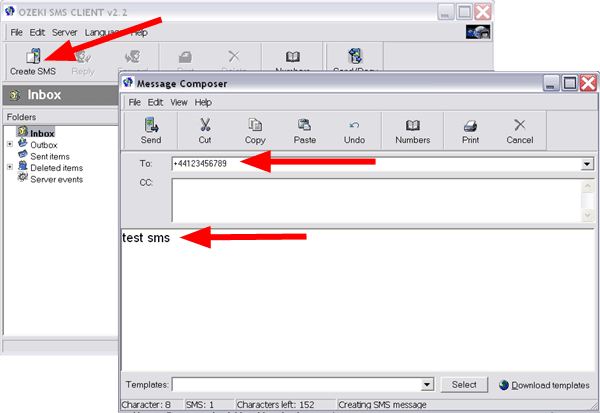
For the first essential step in tracking a message state is to compose the message in the Ozeki SMS Client. Find the "Create SMS" icon at the interface, then enter the essential details into the Message Composer. Type the recipient's mobile phone number into the "To" box, then add your text message into a certain field. After that, click on the "Send" button at the upper left corner of the page.
Step 2 - The message is waiting to be uploaded to the SMS gateway from the client
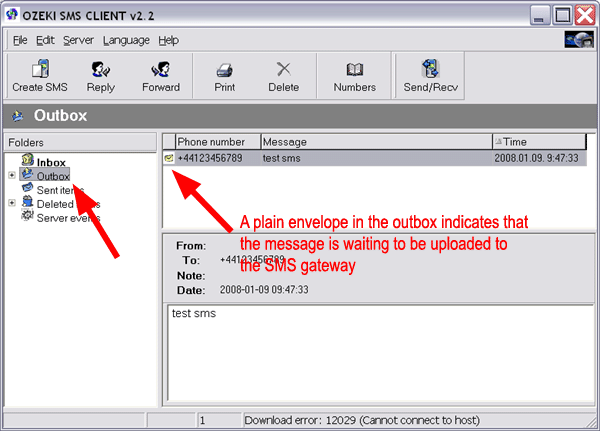
The message enters a queue after being sent using the Ozeki SMS Client and waits to be uploaded to the SMS gateway. Outgoing messages are temporarily held in this queue before being sent to the SMS gateway for further processing before being transmitted to the recipient's mobile network. By opening the "Outbox" folder, a plain envelope indicates that the message is waiting to be uploaded to the SMS Gateway.
Step 3 - The message is in the SMS gateway waiting for transmission
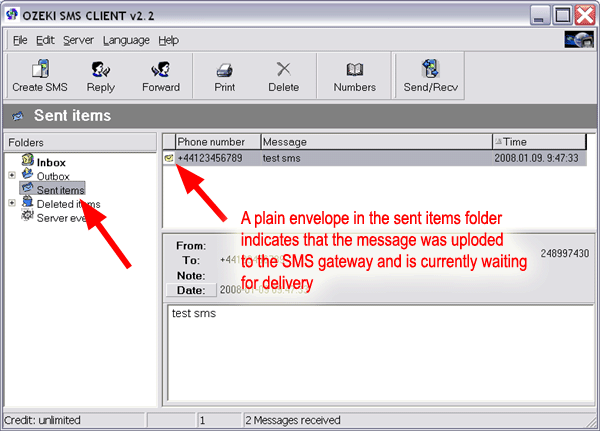
Once the message has been successfully uploaded to the SMS gateway, it enters a temporary storage area, in the "Sent items" in the gateway while it awaits transmission to the recipient's mobile network. To make sure the message is successfully sent to the recipient's mobile network, the SMS gateway regularly checks the message's status and, if necessary, employs retry mechanisms.
Step 4 - The message is transmitted
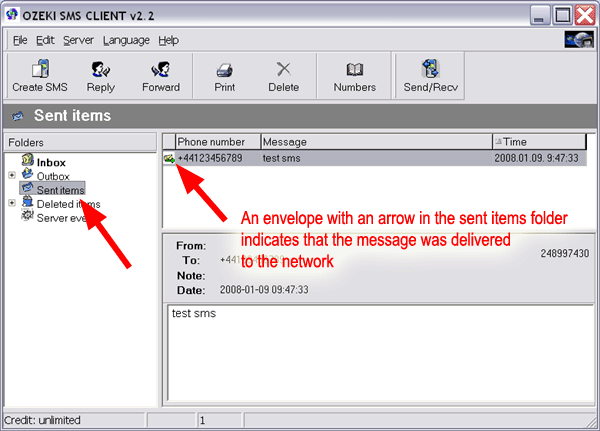
During the transmission process, the message is delivered from the SMS gateway to the recipient's mobile network. An envelope in the "Sent items" folder means that the message was delivered to the recipient's network. Successful transmission depends on the recipient's phone's availability and the reliability of the recipient's mobile network.
Step 5 - The message is received on the destination phone
Once the message has been transmitted and successfully delivered by the recipient's mobile network, it is received on the destination phone as an incoming SMS notification. The recipient can read the message in their inbox and take appropriate actions based on its content, completing the SMS delivery process. A green arrow on an envelope within the "Sent items" folder signifies that the message has been successfully delivered to the network.
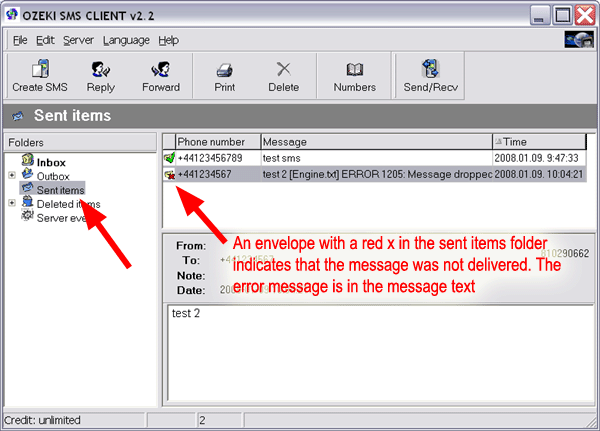
On delivery error you get a different indication
On delivery error, you will receive a different indication in the "Sent items" folder. Instead of a green arrow, there will be a red x indicating the delivery failure or reason for the unsuccessful transmission. The error message will be visible in the message text, providing details about the issue.
FAQs
How to send SMS with Ozeki?
Install the program on your PC or server before beginning to send SMS using Ozeki SMS Gateway. Get the necessary API information, including endpoints and credentials, then configure the SMS Gateway using it. To programmatically deliver SMS messages to receivers, use the given API (such as HTTP or SMPP).
Do I need Internet connection to operate Ozeki NG SMS Gateway?
No, you do not need an Internet connection if you connect to the mobile network through GSM/GPRS modems. However, if you connect to the mobile network through IP SMS connections, then yes, you will need an Internet connection.
Do I need a public IP address?
No, you do not need a public IP address for Ozeki NG SMS Gateway if you operate it within your LAN (Local Area Network). In a LAN setup, a dynamic IP address assigned to your system through DHCP can be used. However, if you wish to provide an SMS service over the Internet, you will need a fixed public IP address.
Do I need a fix IP address for the SMS Gateway?
The need for a fixed IP address for the SMS Gateway depends on your usage scenario. If you plan to use the software within your office or organization over the LAN, you do not need a fixed IP address for the SMS Gateway. In this case, a dynamic IP address assigned to your system through DHCP can be used. However, if you wish to provide an SMS service over the Internet, you will need a fixed public IP address. This is necessary for external communication and accessibility.
Summary
The provided step-by-step guide explains how to monitor the message's status in
the Ozeki SMS Client, starting with composing the message and concluding with
its successful delivery to the recipient's mobile network. By following the steps
outlined in the guide, users can effectively track the journey of their messages
in the Ozeki SMS Client.
Overall, this feature-rich tool serves as a valuable resource for users seeking
to efficiently track their messages' status within the Ozeki SMS Client. This
improves communication overall and guarantees that important messages efficiently
reach their intended recipients.
More information