

 Quick start
  Download
  Manual
  How to buy
  Contact
  Sign in


Running the example code
Starting the web browser
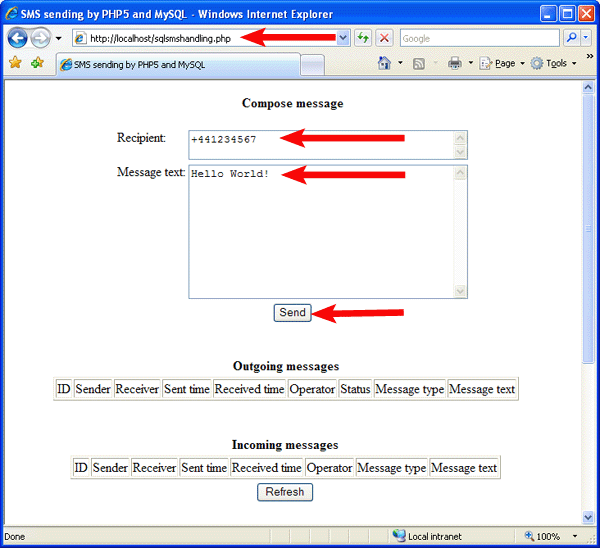
Start the web browser and enter the following: http://127.0.0.1/sqlsmshandling.php
If everything works properly, the page requesting the data
of the message to be sent should open.
Fill in the Recipient and Message Text boxes, and click the Send button.
Response
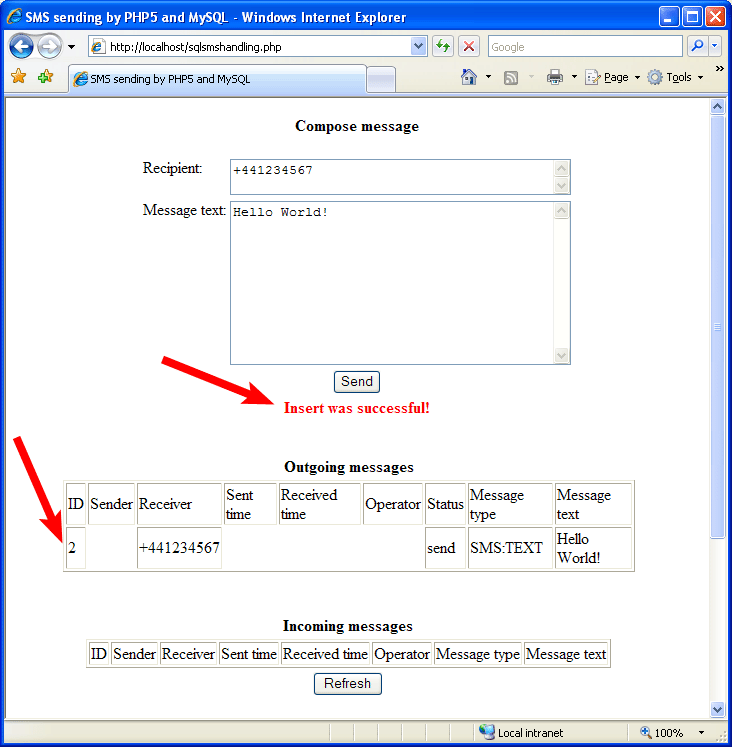
You will receive a response confirming that the message has been successfully inserted. And a new row will displayed in Outgoing messages with the send status. (For more information about message statuses in the ozekimessageout table, visit the SQL Message Statuses page.)
More information
- How to send SMS from a website using PHP and MySQL
- How to send a business card (Vcard SMS) from PHP
- How to receive SMS on a website using PHP API
- Two way SMS solutions using PHP and HTTP API
- How to send SMS from a website using PHP API
- How to add SMS functionality to a website using PHP API
- Send SMS from PHP using HTTP
- FAQ of the Ozeki NG SMS Gateway